Sidecar MCP: turn your REST APIs and CLIs into MCP tools with a YAML file
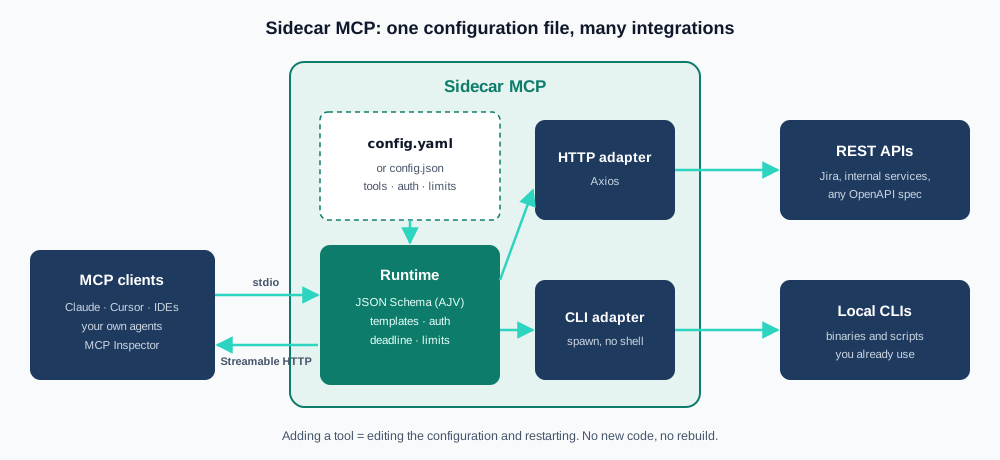
Every time a team wants an AI agent to use an internal system, the same task shows up: write yet another MCP server. A new project, new dependencies, another build pipeline, another way of handling credentials, another set of logs. By the fifth integration there are five nearly identical servers that only differ in which endpoint they call and how they shape the response, and each one has its own idea of what to validate, what to log, and how to cut off a call that never returns.
At Underqubit we hit the same wall while building agent integrations, and the conclusion was that most of those tools don't need code: they need a contract. What the tool receives, which API or command it maps to, how it authenticates, and what it returns. That's why today we're releasing Sidecar MCP as an open-source project under the Apache 2.0 license: an MCP server in Node.js and TypeScript that turns existing REST APIs and CLIs into tools declared in YAML or JSON. Adding a tool means editing the configuration and restarting the process. No programming, no rebuild.
What Sidecar MCP is
The name comes from the sidecar pattern: a process that sits next to systems that already exist and adds a capability without modifying them. Sidecar MCP doesn't replace your API or your CLI; it exposes them through the Model Context Protocol with an explicit contract, so any MCP client — Claude, Cursor, an IDE, or your own agents — can discover and invoke them.
What ships in version 1.0:
- Two execution types: HTTP requests with Axios for REST APIs, and local processes with
spawn(no shell) for CLIs. - Two transports: stdio for clients that launch the process, and Streamable HTTP for a shared service.
- Strict contracts: every tool declares an
inputSchemaand anoutputSchemain JSON Schema 2020-12. Inputs and outputs are validated with AJV on every call. - Service authentication:
apiKey,bearer,basic, andoauth2profiles (client credentials with an in-memory cache), with secrets that can only come from environment variables. - Response shaping:
json,text, andregexparsers, plus JSONata expressions to shape the result before it reaches the model. - Tool groups: several integrations in one process, as a unified catalog, separate endpoints, or both.
- OpenAPI import: scripts that generate the configuration from Swagger 2.0 or OpenAPI 3.x specs.
Quick start
It requires Node.js 24 or later. The package is published on npm as @underqubit/sidecar-mcp, and the binary it installs is called underqubit-sidecar-mcp. With your own configuration file, the flow is two commands:
npx -y @underqubit/[email protected] validate --config /absolute/path/config.yaml
npx -y @underqubit/[email protected] serve --config /absolute/path/config.yaml --transport stdio
validate runs exactly the same checks as startup: configuration schema, duplicate names, JSON Schemas, missing auth profiles, regex and JSONata expressions, and the presence of every referenced environment variable. It never calls an API or runs a CLI, so it's safe to run in CI before deploying.
To connect it to a client that uses the mcpServers format (Claude Desktop, Cursor, and others):
{
  "mcpServers": {
    "underqubit": {
      "command": "npx",
      "args": [
        "-y",
        "@underqubit/[email protected]",
        "serve",
        "--config",
        "/absolute/path/config.yaml"
      ],
      "env": {
        "API_BASE_URL": "https://api.example.com",
        "API_TOKEN": "replace-me"
      }
    }
  }
}
And in Claude Code, with a single command:
claude mcp add --transport stdio \
  --env API_BASE_URL=https://api.example.com \
  --env API_TOKEN=replace-me \
  underqubit -- npx -y @underqubit/[email protected] serve --config /absolute/path/config.yaml
If you'd rather run a shared service than one process per client, the same file is served over HTTP with --transport http. The default endpoint is http://127.0.0.1:3000/mcp.
Anatomy of a tool
A tool is a configuration block with six parts: name, description, input schema, output schema, execution, and response processing. This example exposes a repository's latest commits using git, without a single line of code:
# yaml-language-server: $schema=./node_modules/@underqubit/sidecar-mcp/schema/config.schema.json
version: 1
tools:
  - name: git_recent_commits
    description: Lists the most recent commits of the application repository with hash, author and subject.
    inputSchema:
      type: object
      properties:
        limit: { type: integer, minimum: 1, maximum: 50, description: Number of commits to return. }
      required: [limit]
      additionalProperties: false
    outputSchema:
      type: object
      properties:
        commits:
          type: array
          items:
            type: object
            properties:
              hash: { type: string }
              author: { type: string }
              subject: { type: string }
            required: [hash, author, subject]
            additionalProperties: false
      required: [commits]
      additionalProperties: false
    annotations: { readOnlyHint: true, destructiveHint: false, idempotentHint: true }
    execution:
      type: cli
      command: git
      args: [log, '--max-count=${input.limit}', '--pretty=format:%h|%an|%s']
      cwd: /srv/repos/app
    response:
      parser:
        type: regex
        pattern: '^(?<hash>[0-9a-f]+)\|(?<author>[^|]+)\|(?<subject>.*)$'
        flags: m
        mode: all
      transform: '{"commits": data}'
A few things worth noticing:
- Templates are the only bridge between the model and execution.
${input.limit}takes a validated tool argument;${env.VARIABLE}takes an environment variable captured at startup and never exposed to the model. There's no JavaScript evaluation and no shell substitution. spawnruns withshell: false. Each element ofargsis a literal argument: if the model sends5; rm -rf /, the schema rejects it for not being an integer, and even if it were a string, it wouldn't create a second command.- The child process inherits a minimal environment (
PATH,LANG, temp directories, and little else). Any other variable has to be declared explicitly underexecution.env. - The
yaml-language-serverheader points to the configuration's JSON Schema, so your editor autocompletes and validates as you type.
Integrating a REST API
The same contract works for HTTP. This example looks up a repository in the GitHub API with a service token and returns only the fields the model needs:
version: 1
auth:
  github:
    type: bearer
    token: '${env.GITHUB_TOKEN}'
tools:
  - name: github_get_repo
    description: Gets stars, open issues, default branch and last push date of a GitHub repository.
    inputSchema:
      type: object
      properties:
        owner: { type: string, minLength: 1 }
        repo: { type: string, minLength: 1 }
      required: [owner, repo]
      additionalProperties: false
    outputSchema:
      type: object
      properties:
        fullName: { type: string }
        stars: { type: integer }
        openIssues: { type: integer }
        defaultBranch: { type: string }
        pushedAt: { type: string }
      required: [fullName, stars, openIssues, defaultBranch, pushedAt]
      additionalProperties: false
    annotations: { readOnlyHint: true, destructiveHint: false, idempotentHint: true, openWorldHint: true }
    execution:
      type: http
      baseUrl: https://api.github.com
      method: GET
      path: /repos/{owner}/{repo}
      pathParams: { owner: '${input.owner}', repo: '${input.repo}' }
      headers:
        Accept: application/vnd.github+json
        X-GitHub-Api-Version: '2022-11-28'
      auth: github
      timeoutMs: 10000
    response:
      parser: { type: json }
      transform: >-
        {"fullName": data.full_name, "stars": data.stargazers_count,
         "openIssues": data.open_issues_count, "defaultBranch": data.default_branch,
         "pushedAt": data.pushed_at}
Path parameters are encoded as URL segments and the origin can't change: an owner like ../../another-api can't escape api.github.com. There are no redirects, retries, or implicit proxies either; if the API answers with a status outside 200–299 (or outside the successStatuses you declare), the tool returns an error rather than a half-result.
Authentication without secrets in the file
Profiles are declared once under auth, and each HTTP tool picks one by name. The rule is simple: secrets can't be written as literals, only as references to environment variables. That way the configuration file can be committed safely.
| Type | Fields |
|---|---|
none |
No additional fields. |
apiKey |
in: header or query, name, value: '${env.API_KEY}' |
bearer |
token: '${env.API_TOKEN}' |
basic |
username and password from environment variables |
oauth2 |
tokenUrl, clientId, clientSecret, scopes, tokenAuthMethod |
The OAuth2 profile uses the client_credentials flow, shares a single token request across concurrent calls, caches it in memory, and renews it before it expires:
auth:
  oauth_service:
    type: oauth2
    tokenUrl: '${env.OAUTH_TOKEN_URL}'
    clientId: '${env.OAUTH_CLIENT_ID}'
    clientSecret: '${env.OAUTH_CLIENT_SECRET}'
    tokenAuthMethod: basic
    scopes: [users.read]
For CLIs, credentials travel through env or stdin, using whatever authentication each program already supports. The server doesn't load .env on its own; if you need it, Node does it explicitly with node --env-file=.env.
What happens on every call
Every tool, HTTP or CLI, over stdio or HTTP, goes through the same pipeline:
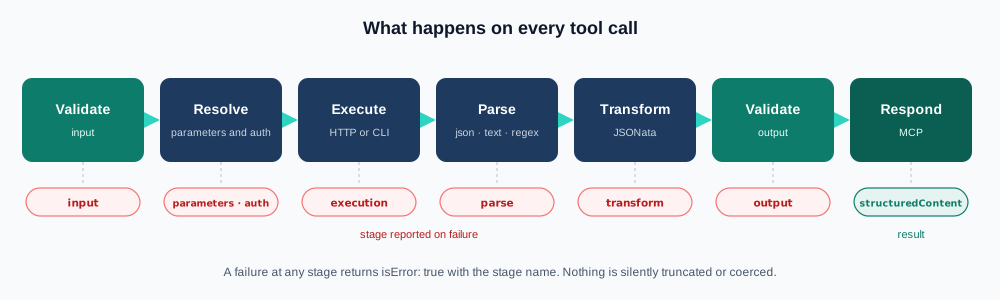
Each stage has a name (input, parameters, auth, execution, parse, transform, output), and when something fails, the MCP response comes back with isError: true and the matching stage. That makes troubleshooting direct: an output error means the API changed shape or the outputSchema is wrong; an auth error points at the token, not the API.
Successful responses include structuredContent — the JSON already validated against outputSchema — plus a text block with the same content for clients that don't read structured content yet. Nothing is silently truncated or coerced: if the result doesn't meet the contract, it's an error.
Regex and JSONata run inside terminable workers, with an empty environment, no filesystem or network access, a default budget of one second, and 64 MiB of heap. A badly written expression or a payload crafted to trigger catastrophic backtracking can't block the process.
A real case: Jira Cloud
The repository ships a complete Jira Cloud integration: search issues with JQL, get an issue, list its comments and its changelog. It's a good example of how the transform protects the model from huge responses. Jira's search API returns dozens of nested fields per issue; the tool hands the agent only what it needs to reason (the transform is abbreviated here; the full one handles null fields):
{
  "execution": {
    "type": "http",
    "baseUrl": "${env.JIRA_BASE_URL}",
    "method": "GET",
    "path": "rest/api/3/search/jql",
    "headers": { "Accept": "application/json" },
    "auth": "jira",
    "successStatuses": [200],
    "query": {
      "jql": "${input.jql}",
      "maxResults": "${input.maxResults}",
      "nextPageToken": "${input.nextPageToken}",
      "fields": "summary,status,issuetype,priority,assignee,updated"
    }
  },
  "response": {
    "parser": { "type": "json" },
    "transform": "{\"issues\": [data.issues.{\"key\": key, \"summary\": fields.summary, \"status\": fields.status.name, ...}], \"isLast\": data.isLast, \"nextPageToken\": data.nextPageToken}"
  }
}
The tool description tells the model how to paginate (nextPageToken: null on the first page, reuse the returned token until isLast: true), and the input schema caps maxResults between 1 and 100. The rules live in the contract, not in a prompt the model is free to ignore.
Several integrations in one process
As the number of integrations grows, you don't need one process per integration. A composition references several integration files, each with its own auth profiles, limits, and variables, and exposes them on a single listener:
version: 1
kind: composition
server:
  name: underqubit
  transport: http
  http: { host: 127.0.0.1, port: 3000 }
mode: both
groups:
  - id: local
    config: ./cli.yaml
  - id: jira
    config: ./jira.json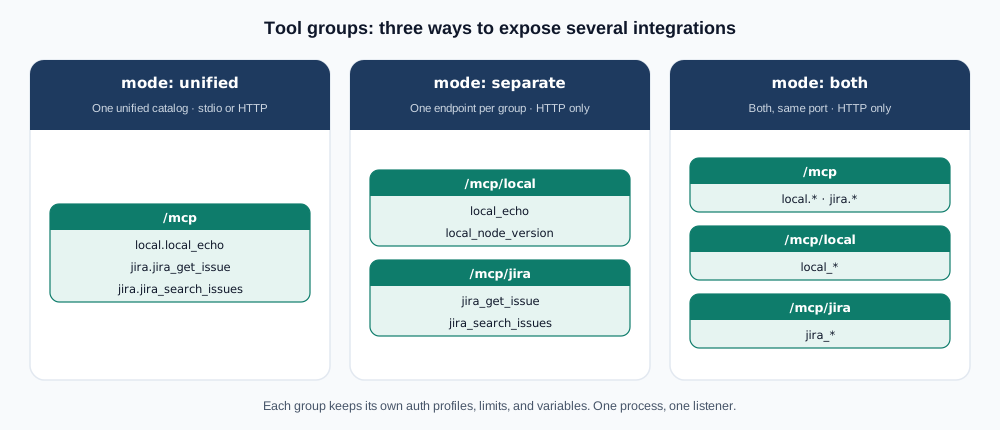
unifiedpublishes a single catalog (at/mcpor over stdio) with prefixed names:jira_get_issuefrom thejiragroup becomesjira.jira_get_issue.separatepublishes one endpoint per group (/mcp/local,/mcp/jira) with the original names. Useful for giving each agent only the tools it should have.bothdoes both on the same port.
One important detail: groups separate configuration, not permissions. The HTTP server doesn't implement inbound authentication, so if you expose per-group endpoints to different consumers, access control belongs in the proxy in front of it.
From OpenAPI to tools in one command
If the API already has a spec, you don't need to write the tools by hand. The import scripts generate one HTTP tool per operation, with description, schemas, parameters, authentication, and transform:
node scripts/openapi-to-config.mjs \
  --input ./api.yaml \
  --output ./tools.json \
  --base-url https://api.example.com/v1 \
  --methods GET,HEAD \
  --prefix catalog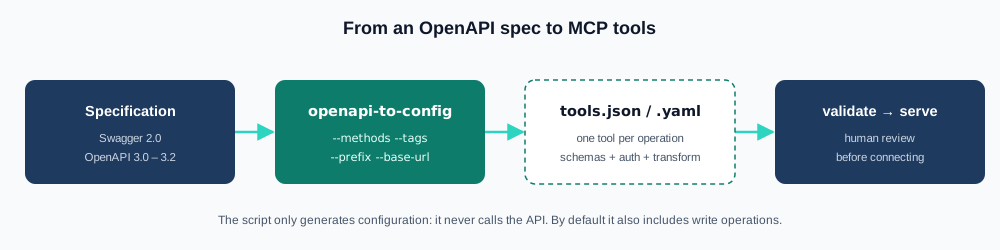
The script accepts Swagger 2.0 and OpenAPI 3.0, 3.1, and 3.2, filters by method or tag, and fails without producing a partial configuration if it finds an operation it can't represent (unless you pass --skip-unsupported). One warning we take seriously: by default it includes all methods, write operations included. That's why the example filters GET,HEAD, and why the last step of the flow is a human review before connecting the result to an agent.
Secure by design
We recently went through the ten most critical attack vectors in AI agents, and several of them — tool abuse, privilege escalation, data exfiltration — play out precisely in the layer that connects the agent to real systems. Sidecar MCP is designed to make that layer boring and predictable:
- The model only supplies declared arguments. The executable, working directory, and HTTP origin don't accept input templates; the agent can't change what it connects to.
- No shell. CLIs run through
spawnwith literal arguments; no pipelines, no interpreted metacharacters. - Secrets out of the model's reach. Only from environment variables, never in logs or in the JSONata input, which receives just the parsed data and metadata such as the HTTP status or the exit code.
- Logs without sensitive content. JSON logs on stderr record the tool, duration, outcome, and error stage; not bodies, arguments, or credentials.
- Loopback by default. The HTTP transport listens on
127.0.0.1, validatesHostandOrigin, and caps request size. To expose it, put it behind a proxy with TLS and authentication. - Limits everywhere. Per-tool timeouts with a global deadline, a maximum output size (stderr counts too), and cancellation that kills the process group and escalates from SIGTERM to SIGKILL.
MCP annotations (readOnlyHint, destructiveHint) describe each tool's intent so the client can ask for confirmation, but they're not an authorization mechanism. The server runs whatever the configuration allows with the permissions of the process user: real least privilege starts with which tools you declare and which credentials the process runs with.
What it doesn't do (yet)
Version 1.0 has a deliberately narrow scope. It doesn't include hot reload of the configuration, per-user OAuth, pipelines that chain several executions, CSV or XML formats, or multipart and binary files. For those cases, or for business logic that doesn't fit a declarative contract, a custom MCP server is still the right tool. For everything else — which, in our experience, is most of it — a YAML file is enough.
Built for agents too
The repository includes a usage skill (skills/sidecar-mcp/SKILL.md) so a coding agent knows how to configure a new integration, connect a client, or troubleshoot a failing tool, following the project's own conventions. It also ships an evaluation set with read-only questions over a fixed sample, to measure how well an agent uses the exposed tools.
The full documentation, in English and Spanish, covers configuration, authentication, responses, tool groups, OpenAPI import, architecture, and operations.
Get started
- Source code: github.com/underqubit/sidecar-mcp
- npm package: @underqubit/sidecar-mcp
- License: Apache 2.0
If there's an API or CLI your team uses every day, try describing it as a tool and connecting it to your agent. Issues, pull requests, and example integrations are welcome. And if you're figuring out how to bring AI agents to your organization's critical systems with these same principles of contracts, least privilege, and observability, let's talk.